

Why Video Podcasts Need a Different Production Workflow
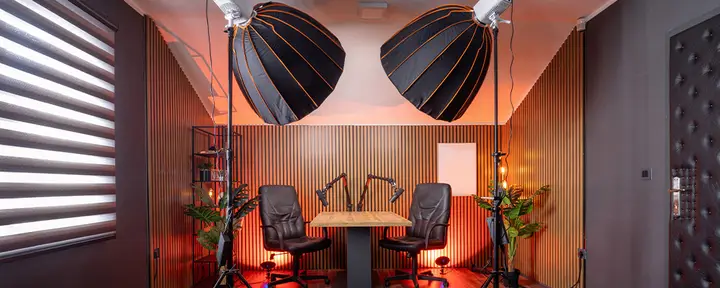
A video podcast is not simply an audio podcast with cameras turned on.
Audio podcasts ask the audience to listen. Video podcasts ask them to listen and watch. That adds new creative decisions, technical requirements, and publishing formats to every episode.
The conversation still matters most, but the workflow surrounding it has to change. Hosts and producers must think about lighting, framing, layouts, branding, captions, visual transitions, and platform-specific exports alongside sound quality.
For an independent creator, these details can make production feel more complicated. For an agency managing several shows, they can create serious operational challenges.
The solution is not necessarily a larger production team. It is a workflow designed for the format you are actually creating.
The common mistake: treating video as an add-on
Many podcasts begin as audio shows. When creators decide to add video, the first instinct is often to place a camera in front of the host and continue using the same process.
That approach may capture usable footage, but it rarely produces an intentional video experience.
A strong video podcast needs to answer questions that do not exist in audio production:
- What should viewers see when different people are speaking?
- How will remote guests be framed?
- Which visual elements make the show recognizable?
- Will graphics or screen shares appear during the conversation?
- Which moments should work as social clips?
- Does the episode need both horizontal and vertical versions?
- Will the show be recorded, livestreamed, or both?
These decisions affect how the episode should be prepared, recorded, directed, and edited.
Start with the outputs, not the equipment
It is easy to begin video podcast planning with cameras, lights, and software. A better starting point is the content you want to publish.
One recording session might need to produce:
- A full video episode
- An audio podcast episode
- A livestream recording
- Horizontal video clips
- Vertical social clips
- Captions and a transcript
- Promotional graphics or quotations
Each output has different requirements. A layout that looks good in a full-length landscape video may be difficult to crop for a vertical clip. A mixed recording may be fast to publish, but separate participant tracks give an editor more control.
Defining the outputs first helps you make better choices throughout production.
A six-stage video podcast production workflow
1. Plan the visual format
Before scheduling the recording, define how the show should look.
Choose the primary layout, brand colors, backgrounds, logos, lower thirds, and any media that will appear during the episode. Decide whether the host and guests will remain on screen together or whether the layout will change based on who is speaking.
You should also identify potential moments for screen shares, demonstrations, graphics, or prerecorded clips.
This does not require planning every second. It simply gives the session a visual structure instead of leaving presentation decisions until the edit.
2. Prepare guests for the camera
An audio guest can often participate successfully with a quiet room, headphones, and a reasonable microphone. Video introduces more variables.
Guests need simple guidance on:
- Camera placement
- Front-facing lighting
- Background selection
- Clothing patterns
- Headphone use
- Browser and device requirements
- Notification settings
- Space around the face for reframing
A short preflight check can catch distracting backgrounds, poor camera angles, echo, and lighting problems before the interview begins.
The objective is not to give guests a technical manual. It is to make the joining and preparation process clear enough that they can appear confidently on camera.
With Boomcaster’s browser-based recording studio, guests join through a link without installing software or creating an account. Device checks and backstage preparation help producers confirm that participants are ready before the session starts.
3. Capture separate, high-quality tracks
Recording the live call itself is not enough for a polished remote video podcast.
When a recording depends entirely on the internet connection, weak Wi-Fi can produce frozen images, choppy audio, or reduced video quality. Those problems may become part of the final file.
Local recording captures each participant on their own device before uploading the media. This helps preserve quality even when the live connection is less than perfect.
Separate tracks also give editors more control. They can adjust one speaker’s audio, reframe an individual camera, remove a distraction, or create a single-person social clip without affecting the other participants.
Boomcaster captures local audio and up to 4K video, with isolated tracks for each participant. Progressive uploads and cloud backup help protect the recording during the session.
4. Direct what the audience sees
Video introduces decisions that must be made while the conversation is happening.
Someone may need to:
- Switch between speaker and split-screen layouts
- Bring guests on screen
- Display titles or graphics
- Play supporting media
- Manage screen shares
- Monitor participant quality
- Prepare speakers backstage
- Handle a livestream
A solo creator may manage these controls while hosting. Larger productions often assign them to an off-camera producer so the host can focus on the conversation.
Making visual decisions during the recording can also reduce post-production. If layouts, graphics, and media are handled intentionally in real time, the recorded program may already be close to a publishable version.
5. Edit audio and video together
Audio editing focuses on clarity, pacing, levels, music, and unwanted noise. Video editing must address those elements while keeping the picture synchronized.
The editor may also need to switch camera angles, correct color, reframe shots, insert supporting media, add captions, create titles, and remove visual distractions.
This can turn one episode into several editing projects.
Reusable layouts, synchronized isolated tracks, automatic renders, and transcript-based editing can reduce repetitive work. The goal is not to remove creative control. It is to avoid spending time rebuilding the same foundation for every episode.
6. Publish for each destination
A video podcast often needs several final versions.
The full episode may be published to a video platform, podcast feed, website, or member community. Selected moments may be reformatted for vertical or square social channels. A livestream may also need a clean replay version.
Each platform has its own expectations for aspect ratio, length, captions, titles, and thumbnails. That is why distribution cannot be treated as the last-minute act of uploading one file everywhere.
The production plan should identify each destination, required format, owner, and approval step before recording begins.
Where audio and video workflows differ most
Once the complete workflow is visible, the differences are easier to summarize.
| Audio podcast workflow | Video podcast workflow |
| Prioritizes microphones and sound quality | Manages audio, cameras, lighting, and framing |
| Prepares guests to sound good | Prepares guests to sound and look good |
| Produces an audio master | Produces audio, video, and social formats |
| Uses audio branding | Uses visual and audio branding |
| Allows many edits to remain unnoticed | Requires audio and video edits to stay synchronized |
| Publishes mainly through podcast feeds | Publishes across podcast, video, live, and social platforms |
The biggest difference is not the presence of a camera. It is the number of coordinated decisions required before, during, and after the recording.
How the workflow changes as production grows
Producing one video podcast is mostly a creative challenge. Producing several shows also becomes an operational challenge.
Agencies and production teams need to manage separate branding, files, roles, guests, and approval processes for each client. Rebuilding layouts and settings before every session wastes time and increases the chance of mistakes.
A scalable production workflow benefits from:
- Reusable studio templates
- Saved layouts and brand assets
- Shared workspaces
- Defined roles and permissions
- Organized recordings and exports
- Off-camera producer controls
- Standard guest preparation
- Consistent review and delivery steps
Independent creators benefit from the same structure. A reusable workflow makes it easier to publish consistently and bring in an editor or producer later.
Use a platform that supports the complete process
A collection of separate recording, streaming, graphics, captioning, and collaboration tools can work. It also creates more setup, file transfers, and opportunities for errors.
Boomcaster combines local recording, isolated tracks, studio branding, producer controls, livestreaming, captions, automatic renders, and team workflows in one browser-based platform.
An independent creator can begin with reliable audio and video recording. As the show grows, the same production environment can support branded layouts, real-time direction, livestreaming, and collaboration.
For agencies, reusable studios and shared workflows help teams maintain consistency across multiple clients and shows.
Frequently asked questions
Why do video podcasts require more production than audio podcasts?
Video podcasts must manage both sound and visual presentation. This adds camera placement, lighting, framing, layouts, graphics, captions, synchronized editing, and multiple publishing formats to the workflow.
What equipment is needed for a video podcast?
A basic setup includes a good microphone, headphones, a capable camera, front-facing lighting, and a stable computer. The recording platform should capture high-quality local audio and video with separate tracks for each participant.
Should remote video podcasts use local recording?
Local recording helps preserve quality by capturing media on each participant’s device. The final result is less dependent on the quality of the live internet connection.
Can a video podcast also be livestreamed?
Yes. A video podcast can be recorded and broadcast live at the same time. The workflow should account for guest preparation, real-time layouts, branding, captions, audience destinations, and the final recorded version.
Build the workflow around video from the start
Video creates new ways to reach an audience, but it changes how a podcast must be planned, recorded, directed, edited, and distributed.
Treating cameras as an afterthought usually creates more work and less consistent results. A video-first workflow gives creators more control and helps production teams deliver episodes efficiently.
Boomcaster provides a production environment that can support a simple remote interview today and a complete multi-show video operation as the work grows.